
A VPN gives them the network. They only needed four servers
The request is always small: this person has to administer those servers, from outside.
What gets issued is a VPN account, because that’s what’s in the rack. A VPN works at the network layer, so what they actually receive is an address on your network, plus whatever the firewall lets through from there. Those rules are old. They were written for machines that have since moved.
Two things follow from that, and neither is a mistake anyone made.
A VPN typically establishes trust when the tunnel comes up. After that, what becomes reachable is governed mainly by routing, firewall rules and segmentation rather than by a fresh, identity-aware decision for each system the person opens. Those controls can be tightened — but tightening them is a network project, run by a different team, on rules that are older than the servers.
The VPN has to listen on the internet. Its gateway is a service you publish. It gets scanned every day, and every advisory against it has to be patched before somebody else reads it. It’s the one box you’re obliged to expose — which is why remote access gateways keep appearing at the start of incident reports.
You asked for a door to four servers. The protocol only knows how to build a door to the network.
Zero trust is the other way round. Nothing is trusted because a tunnel came up twenty minutes ago. Every connection is authorized on its own, every time — and the only things reachable are the ones that were authorized.
How it works
Both ends dial out, and the middle can’t read what it carries
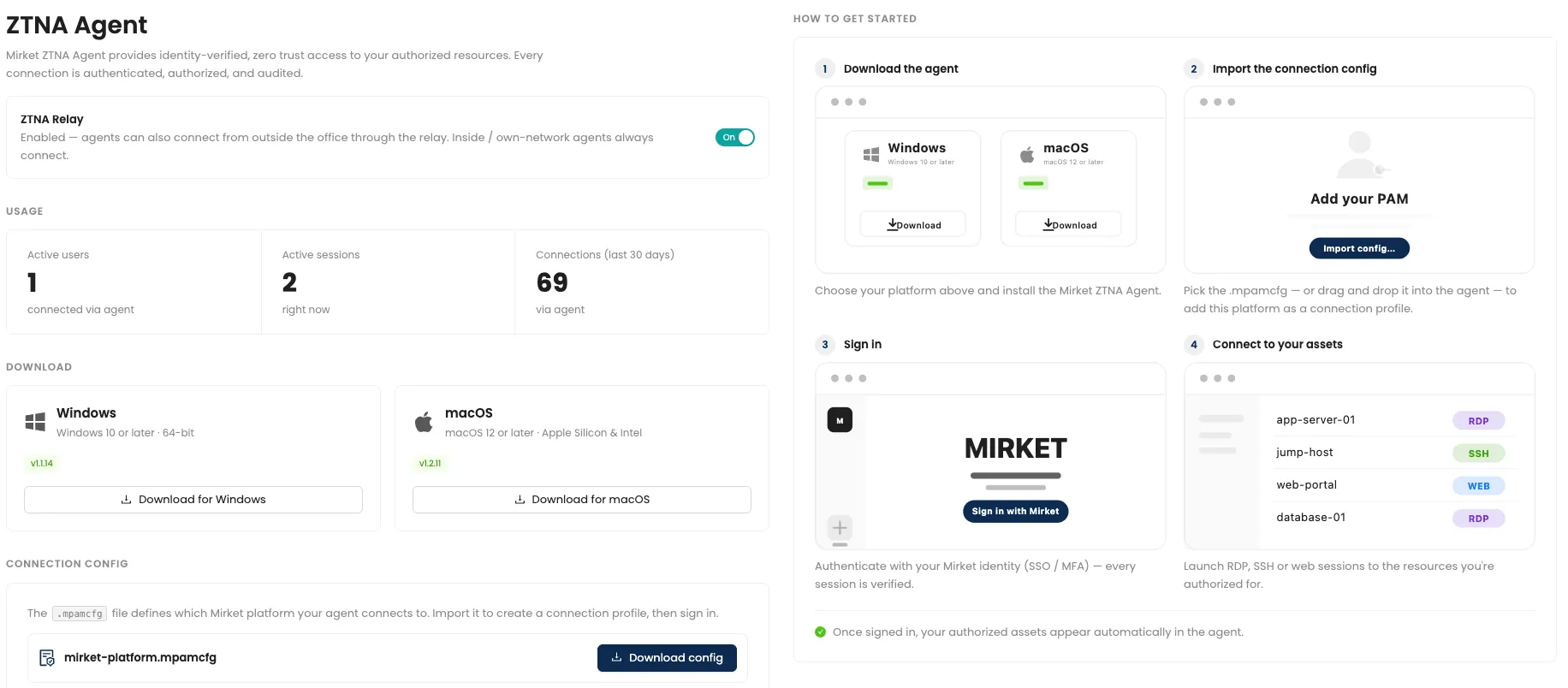
- The administrator opens the Mirket agent on their Windows or macOS machine and signs in — through your own single sign-on, if that’s how you do it.
- The agent opens a loopback listener on their own machine. That’s the whole client-side footprint: no virtual network interface, nothing added to the routing table.
- Their session is carried, encrypted, to the Mirket Relay, which the agent dialled outbound.
- Inside your network, a connector has also dialled outbound to the same relay. The two meet there. Neither side is listening for an inbound connection, so there is no published port at your edge.
- The connector hands the session to PAM, which authorizes it — this user, this target, this account, this schedule — and records it.
Step 5 runs for every connection. Opening a second server is a second authorization, not a continuation of the first one. Nothing carries over, and there is no state in which the user is simply “connected” and therefore trusted.
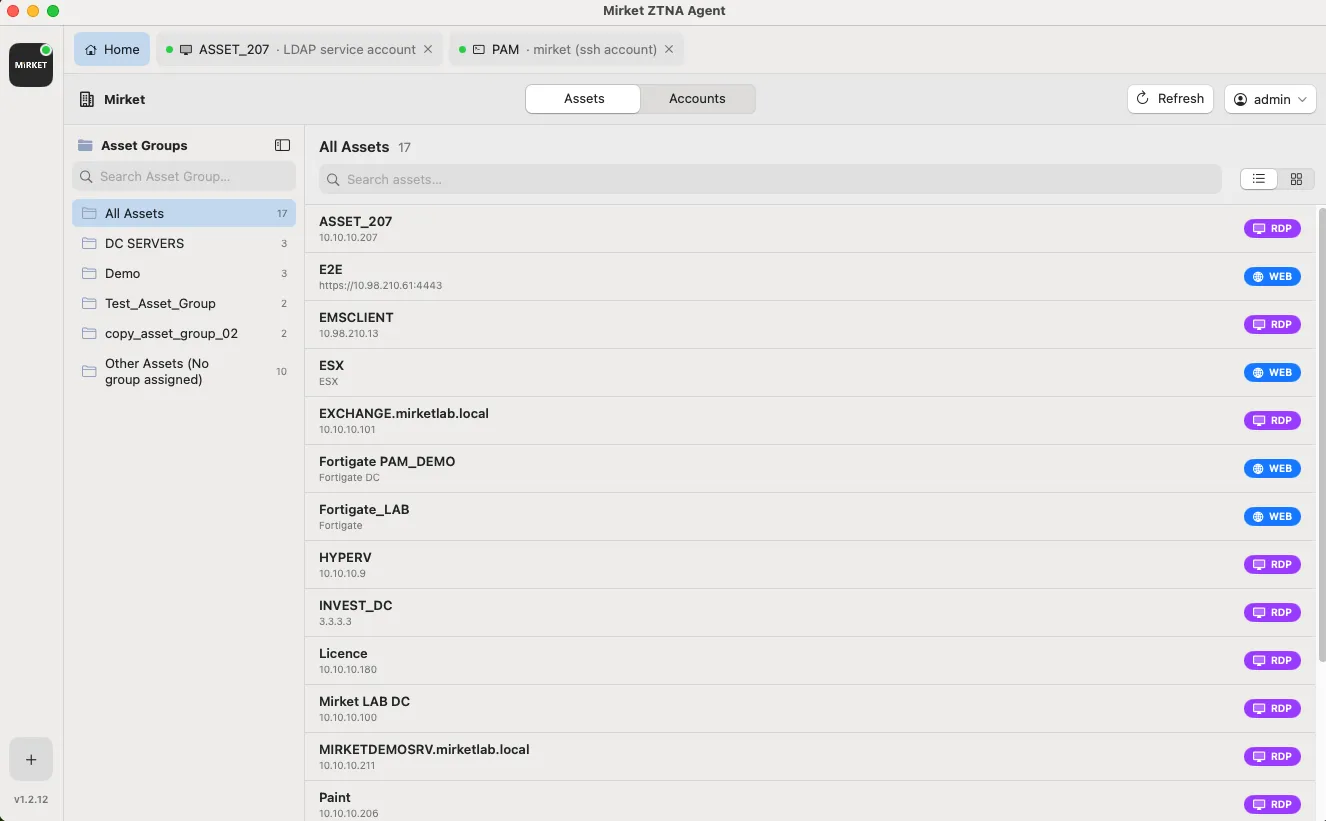
The agent is how they connect, and it’s the only thing they have to learn. They double-click the server they want and a full RDP or SSH session opens in front of them — inside the agent, with the tooling built in, using the Windows RDP client where that applies — or an isolated browser for internal web applications. Nothing about how they work changes. What changed is the path underneath it.
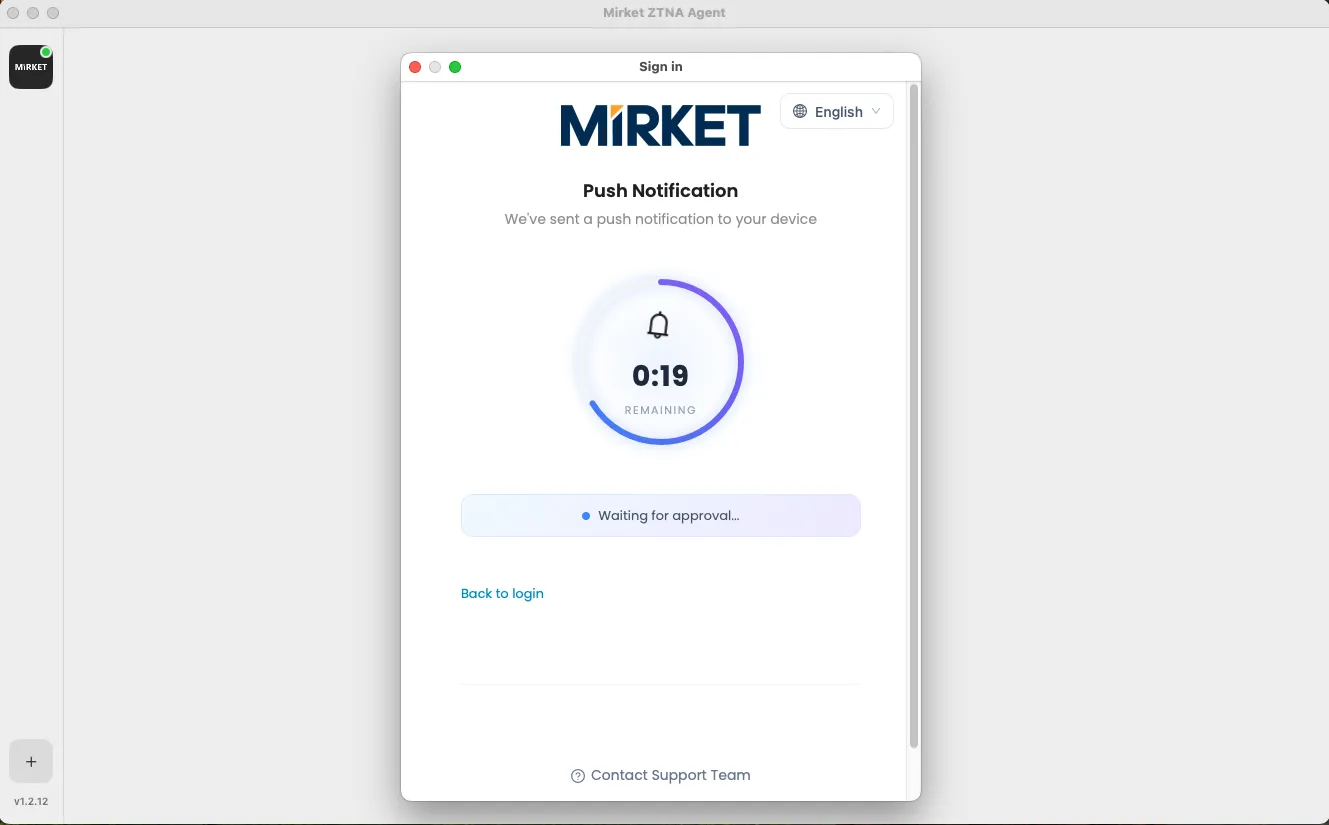
That the session lives inside the agent is a control, not a cosmetic choice. It isn’t a loose window on the desktop that can be pointed somewhere else, and a screen capture taken on that machine shows the session area blacked out — which matters most for exactly the people this module exists for: contractors, suppliers and anyone on a laptop you don’t manage.
Detection
An attempt at a system they weren’t mapped to is an event, not a routing decision
On a VPN, an administrator who connects to a server they have no business reaching produces a TCP session — and, if the network controls happen to cover that path, a firewall deny. What it doesn’t produce is an identity-aware decision: nothing at the point of connection asked whether this named person should be opening this named system, because the trust decision was made when the tunnel came up.
Here, authorization is per session and at the application layer. A connection attempt to a target the user isn’t mapped to doesn’t quietly succeed and it doesn’t quietly fail — it’s a denied authorization against a named person and a named system, which is a specific line worth forwarding to your log platform.
And because the session is recorded and transcribed, the ones that are authorized leave evidence of what was done, not merely that a connection happened.
Capabilities
The path
| Zero inbound ports | The connector dials outbound. Nothing listens at your edge, so there is nothing at your edge to scan |
| Noise_IK end-to-end encryption | The relay forwards ciphertext between agent and connector and holds no key for it |
| Loopback listener | No utun, tun or tap device is created on the user’s machine, and no entry is added to their routing table |
| Layer 7 per-application authorization | Only the targets a user is explicitly mapped to are reachable. The internal network is not exposed |
| Authorization on every session | Each connection is authorized again rather than inheriting a tunnel established once |
The access
| Native RDP | A full RDP session inside the agent, using the client built into Windows where that applies, with no VPN and no published RDP port |
| Native SSH and SFTP | SSH tooling built into the agent, with file transfer over the same path and under the same audit |
| The session stays in the agent | It doesn’t open as a separate window on the desktop, and a screen capture of that area comes out blacked out |
| Web access through the isolated browser | Internal web applications are reached without being published to the internet |
| Recording and command transcript | Remote access is recorded and transcribed exactly as an internal privileged session is |
The agent
| Windows and macOS | One agent, and it’s required — it’s what carries native RDP, native SSH and browser-isolated access. The macOS build is Apple-notarised, so enterprise deployment raises no Gatekeeper warning |
| Sign-in through your SSO | The agent authenticates the user through the organization’s own single sign-on (OIDC) |
| Central version management | Agent versions are managed centrally and updated without touching the endpoint |
| Enterprise branding | The agent carries your organization’s name and visual identity, not ours |
| Self-service download page | End users get the agent from their own page, separate from the admin console |
| Clipboard control | Clipboard rules apply inside agent sessions as they do everywhere else |
| Per-user usage information | Administrators can see which users are using the agent, and how much |
| Revocation with profile wipe | Revoking a user removes their profile from the endpoint automatically — no visit to the machine, no ticket, no trusting them to uninstall it |
| HA node visible per session | Each session records which high-availability node served it, which shortens troubleshooting from an afternoon to a glance |
What actually changes, against a VPN
| Classic VPN | Mirket ZTNA |
|---|---|
| Operates at layer 3 — the network | Operates at layer 7 — the application byte stream |
Creates a virtual interface (utun / tun / tap) | A loopback listener and nothing else |
| Adds routes to the client machine | Leaves no entry in the routing table |
| The internal network becomes reachable | Only explicitly authorized targets are |
| Connect once, go anywhere | Authorization evaluated on every session |
| The tunnel terminates at the gateway, which can read it | Encrypted end to end — the relay cannot decrypt |
| The gateway must listen on the public internet | The connector dials out. Zero inbound ports |
| Logs that a connection happened | Video recording and a full command transcript |
See a remote session that never touches your network
An administrator connecting from outside in a native RDP or SSH session, no VPN, nothing listening at your edge, and the whole session recorded on your own servers.

Two questions your security architect will ask
We run the relay, and we cannot see your sessions
This is the first question every security architect asks, and it deserves a direct answer rather than a policy commitment.
Traffic between the agent and the connector is encrypted end to end, using Noise_IK. The two ends establish their keys with each other. The relay sits between them and forwards bytes it has no key for.
That means the answer to “can Mirket read my administrators’ sessions?” is not “we promise not to” — it’s that the relay is carrying ciphertext, and possessing it doesn’t help. A compromise of the relay yields encrypted bytes going in one side and out the other.
It matters because the alternative architecture — terminate TLS at the gateway, inspect, re-encrypt — is what most remote access products do, and it makes the middle a place where every privileged session in the organization exists in plaintext, briefly, on somebody else’s machine.
No virtual interface is why “connect once, go anywhere” doesn’t happen
A VPN client creates a network interface and writes routes into the operating system. That is what makes the internal network reachable — not a policy decision, a routing table entry. Once it’s there, every application on that laptop can use it, including the ones nobody chose to give access.
The Mirket agent creates nothing. It listens on loopback, on the machine’s own address, for the specific sessions the user opens. There is no route to the internal network because no route was written, so the question of whether the user’s other software can reach your servers doesn’t arise. It can’t, and not because something is blocking it.
What this means for a device you don’t manage. The user’s machine never becomes a node on your network. It runs an agent that carries specific, authorized sessions — which is a much smaller thing to trust than a laptop you’ve addressed into your estate.
Audit and compliance
A product can’t make you compliant. It can give you something specific to show. Remote privileged access is usually read against these.
PCI DSS v4.x
Req. 8.4 and 8.5Multi-factor authentication for all remote access into the environment, implemented so it cannot be bypassed. Authorization runs per session rather than once per tunnel
PCI DSS v4.x
Req. 10.2Actions taken by anyone with administrative access are logged. The recording and transcript cover the action, not the connection
ISO/IEC 27001:2022
A.6.7, A.8.2Remote working and privileged access rights, applied to sessions that originate outside the organization's premises
NIS2
Art. 21Secure remote access, access control and multi-factor authentication for essential and important entities
Deployment
On-premise. Two things are added inside your environment: the connector, which dials outbound to the relay, and PAM, which does the authorizing and the recording. If Mirket Portal is already running, PAM is a module on it.
Nothing is published. No firewall rule accepts an inbound connection for this, no port is forwarded, no service is exposed. The connector needs outbound HTTPS and nothing else.
On the user’s side, the agent installs on Windows or macOS and is updated centrally.
Your identity, credentials, policies and recordings stay in your environment
This is worth being precise about, because “zero trust” and “cloud” usually arrive together and here they don’t — and because the honest version is stronger than a slogan.
| What it is | Where it lives |
|---|---|
| Users, groups and directory data | Your servers |
| Authentication and the second factor | Your servers |
| Authorization — who may reach what, with which account | Your servers |
| Privileged credentials | Your servers |
| Session recordings and command transcripts | Your servers |
| Audit logs | Your servers |
| Session traffic in flight | The one thing that transits the Mirket Relay — encrypted end to end between agent and connector, with the relay holding no key that would let it decrypt |
So, precisely: only end-to-end encrypted session traffic passes through the Mirket Relay, and the relay does not hold the keys required to decrypt it. It stores nothing and it decides nothing. Every decision on this page — who may reach what, with which account, and what gets recorded — is made by software running inside your own data center, and everything that persists stays there.
You pick one, and the two can’t be mixed inside a single license. Concurrent is usually cheaper where a large administrator population is only partly connected at once.
The Mirket Native Client is included with PAM for internal network access at no extra cost; ZTNA is added only when you want remote access from outside without a VPN.